Somewhere on your team there's a tool someone built years ago. An Excel macro that turns a supplier quote into your cost sheet. A custom CAD feature that drops in a standard hole pattern. A small in-house program that renames drawings before release. It does one job well, as long as the input arrives in exactly the right shape.
Then a supplier changes their PDF layout, or a part arrives with an exception nobody planned for, and the tool breaks. That isn't a bug, and it isn't anyone's fault. It's how tools from that era were built.
If you're wondering about AI agent vs automation, the short answer is this: the old tools follow a script, and an AI agent starts from a goal. In our first post we looked at AI that chats versus AI that acts. This post is about what that means for the automation you have, and the automation you never got around to building.
Macros vs AI agents: rules vs goals
A macro is a recipe. Someone wrote every step ahead of time: open this file, read cell B4, copy it to that sheet, save. It never decides anything.
An AI agent gets a goal instead, like "get these supplier prices into our cost sheet." It looks at what's in front of it, picks a step, sees what happened, and decides what to do next. If the PDF layout changed, it reads the new layout instead of failing on the old one.
There's another side to this. Most of the automation that could help an engineering team never got built. The person who knows a job inside out is usually busy doing the job, and writing code is its own craft that lives with someone else, if your team has that person at all. Asking them feels like a favour, so the idea waits in your head.
With an agent, you describe the job in plain words, the way you'd explain it to a new colleague, and the automation fits your exact case. Your knowledge of the work is the hard part. It always was.
What is an AI agent, in simple terms?
An AI agent is a goal, some tools, and a loop. The goal is what you want done. The tools are what it's allowed to use, like reading files or filling a spreadsheet. The loop is how it works: read, decide, act, check, and repeat until the job is done. Then it hands the result to you.
Google Cloud describes AI agents as software that pursues goals and completes tasks on behalf of users, unlike bots that follow predefined rules. Anthropic's Building effective agents puts it this way: a workflow runs along predefined code paths, while an agent directs its own process and chooses its tools.
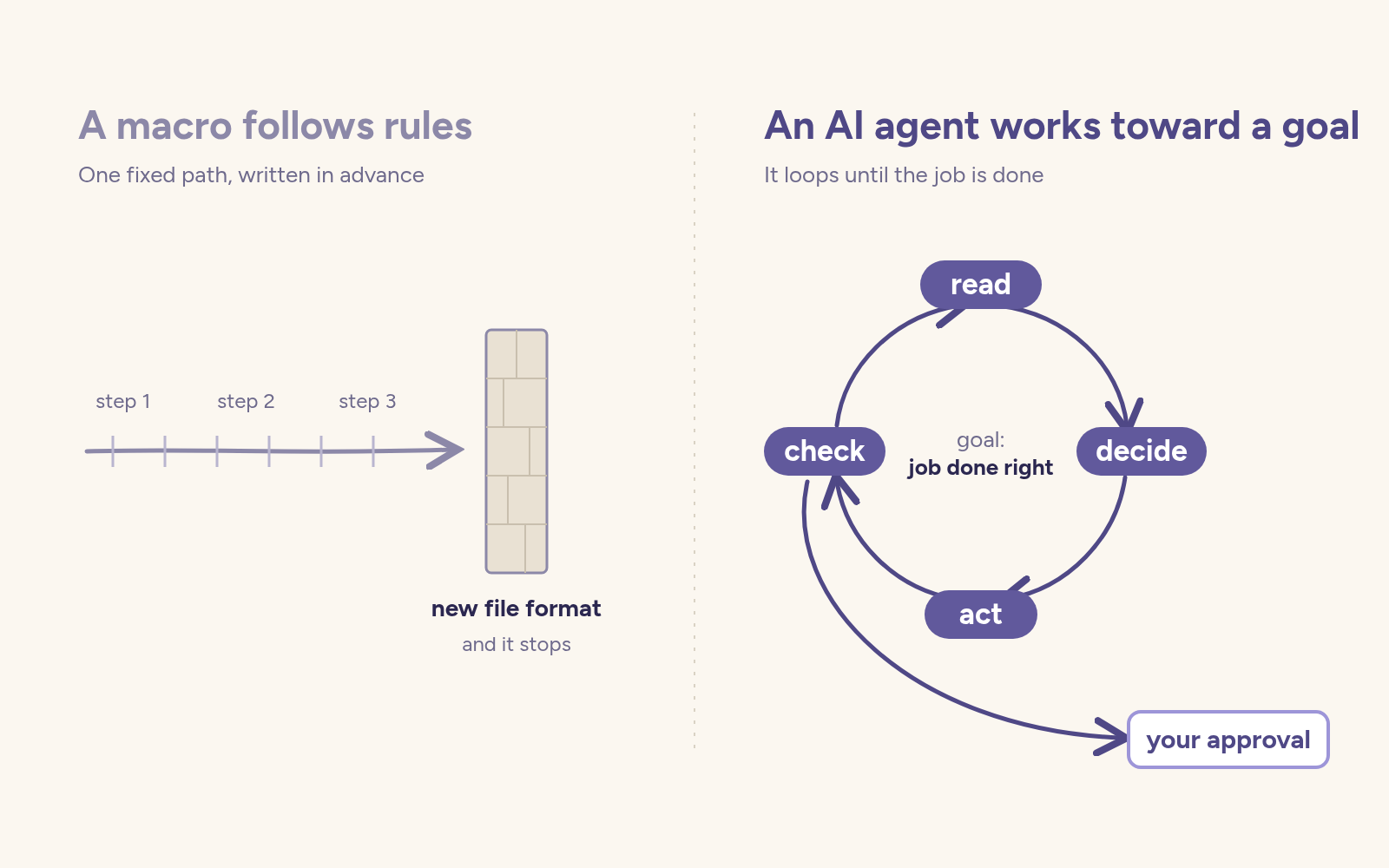
A chatbot answers. A macro repeats. An agent works toward something, then shows you what it did.
Your macros were built for a different era
Macros, custom CAD features and in-house scripts were the best option when software could only follow instructions. So they needed rigid inputs. Each did one job. Someone had to maintain them, and when that person moved on, nobody dared to touch them. When a new file format or numbering scheme arrived, they broke.
That's not a failure of the people who built them. It was the limit of their time. And one more limit is worth naming: back then, only people who could write code got to automate. Everyone else did it by hand.
Where an AI agent earns its keep
Agents are most useful exactly where macros choke: messy inputs and exceptions.
A supplier sends a quote in a new PDF format. An agent can read it, fill your sheet, and show where it found each value so you can check. Two revisions of a part have notes scattered across a drawing, an email and a change request. An agent can gather them into one view of what changed.
In each case, the agent works toward the goal and you approve the result. You stay the engineer. It does the legwork.
Alireza Jalili, who writes about AI in CAD, put it clearly in a post about an open source agent for SOLIDWORKS: "A script follows a predefined sequence. An agent can select an operation, receive the result, and decide what to do next based on it."
LinkedIn post — Alireza Jalili on how an open source AI agent works inside SOLIDWORKS.
Open on LinkedInLoading the embed contacts LinkedIn. Show the post here when you are ready.
AI agent vs automation: which fits the job now?
For anything with messy inputs or frequent exceptions, the default is shifting toward agents: reading documents, sorting files, pulling information from several places, preparing a first draft for review.
A fixed path still makes sense where the result must be identical every time, like safety interlocks or compliance steps. HiveMQ makes this point on AI versus rule based automation in manufacturing: rule based control stays right for safety and compliance, AI fits the variable cases, and the two run side by side.
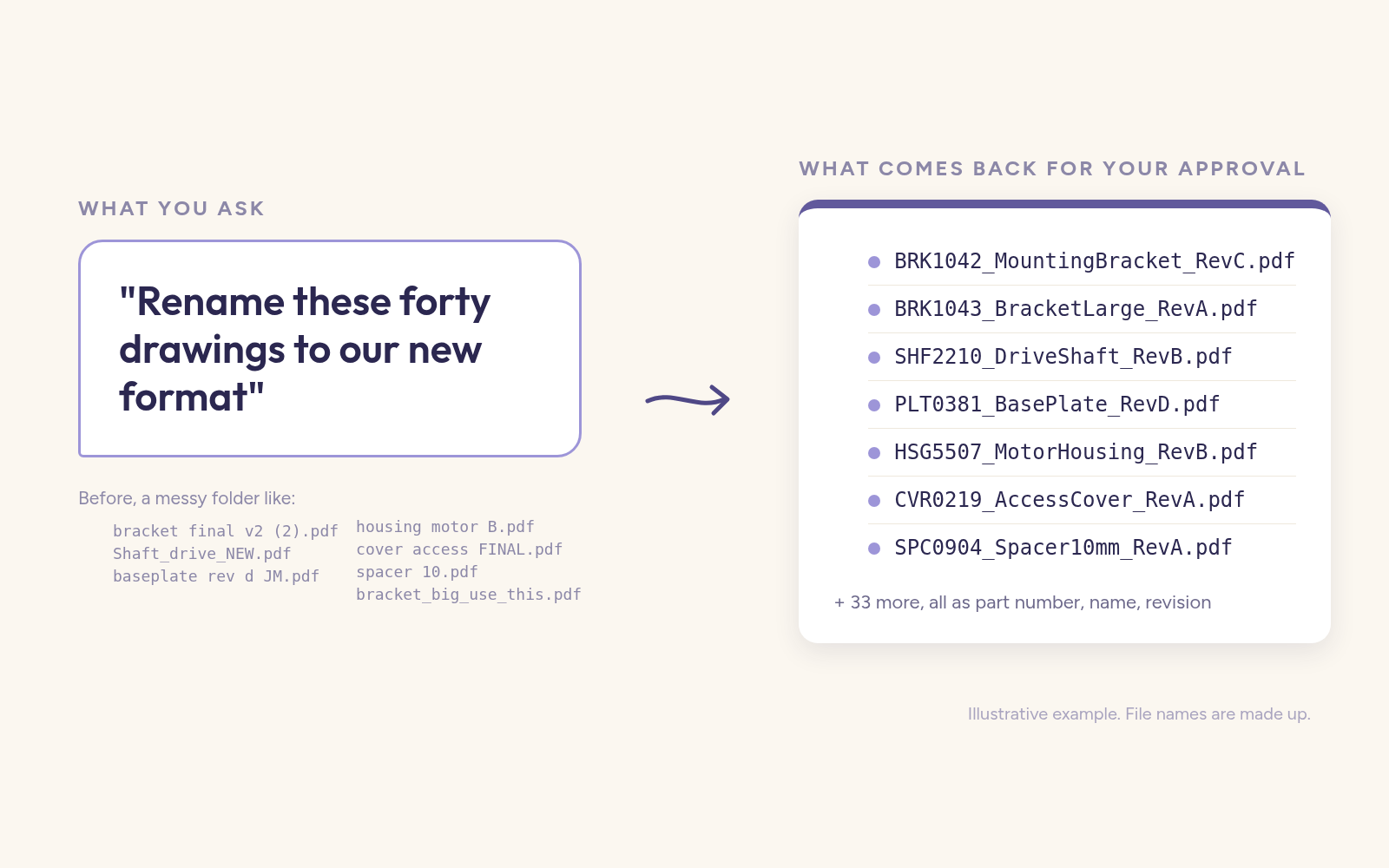
Renaming forty drawings to a new standard used to mean writing a macro or an afternoon of clicking. Now you describe the format in one sentence, let an agent propose the names, and check the list before anything changes.
Try this on Tuesday
You don't need a project or a budget. You need one annoying task.
- Pick one job you repeat every week, or one macro that keeps breaking.
- Note the inputs it struggles with: odd formats, exceptions, files that never fit.
- Write a sentence or two describing what "done" looks like.
- Give that goal to an AI tool your company has approved, with a few real sample files.
- Ask it to show where it looked and why. Check the result before you use it.
If it gets it wrong, that's useful too. You'll learn to describe the job more clearly, which is the skill that matters most.
The question neither one answers yet
Either a macro or an agent can tell you what changed on Rev C. But ask why the wall thickness went to 4 mm, and neither knows. That reason lives in someone's head, a meeting nobody wrote down, or an email thread that's hard to find. That's where our next post picks up.
Frequently asked questions
What's the difference between a macro and an AI agent?
A macro follows fixed steps written in advance and stops when the input doesn't match. An AI agent works toward a goal, reading, deciding, acting and checking, so it can handle inputs that change.
What is an AI agent in simple terms?
Software that takes a goal, uses tools like files and spreadsheets, and loops through read, decide, act and check until the job is done. Then it shows you the result to approve.
Should I replace my macros with an AI agent?
Not all at once. Keep fixed automation where results must be identical every time, like safety or compliance. Try an agent first where your macros keep breaking.
Is agentic AI the same as an AI agent?
They're closely related. Agentic AI describes AI that acts on its own toward a goal, and an AI agent is software built that way. IBM's [explainer on agentic AI](https://www.ibm.com/think/topics/agentic-ai) goes deeper.
Can AI write macros for me?
Yes, many AI tools can write a macro from a plain description. But an agent can often do the job directly and adapt when the input changes, instead of handing you another fixed script to maintain.