You tried ChatGPT once. It wrote a nice email and confidently got your tolerance wrong. Fair. That's the chatbot. It's not the whole thing.
If you work with drawings, specs, routings or inspection reports, and not with code, most of what you've heard about AI probably sounds like it was written for someone else. Software people get the demos. You get a text box that is very sure of itself.
This post is for you. No hype, no jargon you need to look up. Just what AI is, what it can actually do on a normal engineering day, and where it still falls short. At the end there's a test you can run this week with one real document.
What is AI, really?
Strip away the marketing and today's AI does three things: it reads, it reasons, and it can take steps.
It reads text, tables, PDFs and images. It reasons about what it read: what matches, what doesn't, what's missing. And when it's connected to tools, it can take steps: open a file, look something up, compare two things, write down what it found.
The chat window is just one way in. It's the front desk. When you type a question and get an answer back, you're only using the "reads and reasons" part, and only on whatever you pasted in.
IBM Technology's short explainer, What are AI Agents?, walks through this well: a model on its own answers from what it knows, while an agent can plan, use tools and work through a task step by step. Worth ten minutes if you want the picture without the buzzwords.
Chat vs act: answering is not doing
Here's the simplest way to see the difference.
A chatbot answers. You ask, "Does this part meet the spec?" and it tells you what it thinks, based on whatever you typed.
An agent acts. You give it a goal, "check this part against the spec", and it opens the drawing, opens the spec, goes line by line, and flags what doesn't match. Then it shows you where it looked.
This isn't a marketing idea. It comes from research:
- The ReAct paper (Yao et al., 2022) showed that models do better when they think and take actions in turns, instead of just talking.
- Meta's Toolformer paper (Schick et al., 2023) showed that models can learn when to reach for a tool, like a calculator or a search, instead of guessing.
And engineers are already doing it inside the tools you know.
LinkedIn post — Luigi Doria's CADapter demo in SolidWorks
Open on LinkedInLoading the embed contacts LinkedIn. Show the post here when you are ready.
Luigi Doria built a layer that lets an AI agent work directly inside SolidWorks. From a single engineering prompt, the agent built a part and, in his words, the result "is not an exported mesh or simply generated geometry. It is a fully editable parametric SolidWorks model." The comments are full of engineers asking the right question: is it actually manufacturable? That skepticism is healthy. Hold onto it.
On an engineer's Tuesday
Forget the demos for a second. Here's what "AI that acts" looks like on a normal day, whether you're in design, process, quality, manufacturing or the field.
Scene 1: Compare two revisions. You've got Rev B and Rev C of a drawing and someone asks, "What changed?" Instead of flipping between two PDFs with a highlighter, you hand both to AI and ask for a list: dimensions, notes, materials, callouts. It gives you the list in a minute. You check it in five. That's still faster than doing it cold.
Scene 2: Find the last similar job. A customer wants "the same bracket, but bigger." Somewhere there's a job like this from a couple of years ago. AI can search through a folder of past quotes, drawings and work orders and pull up the closest matches, so you start from something real instead of a blank sheet.
Scene 3: Check a change against the spec. A change note says the wall thickness goes up. Does that still meet the customer spec? AI reads both, lines them up and flags anything that conflicts. You make the call. It does the reading.
None of these replace you. They take the tedious reading and cross-checking off your plate so your attention goes to the part that needs an engineer.
Andrew Ng makes a related point in his talk on agentic workflows (Sequoia Capital, 2024): letting AI work through a task in steps, checking and revising its own output, often gets better results than asking once and taking the first answer. That's how engineers work too.
Where it stops
Here's the honest part.
AI doesn't have your judgment. It doesn't know that this customer always pushes back on surface finish, or that the last time someone tightened that tolerance, the shop scrapped a batch. It doesn't know your history unless someone wrote it down and gave it access.
It also can't tell "geometrically correct" from "actually makes sense on our machines" unless you tell it what your machines can do.
Dirk Molitor put the split well in a post on Autodesk opening Fusion to AI agents: "engineers express intent while agents operate the toolchain." You decide what should happen and why. The agent does the clicking, reading and checking. A human still approves.
If you want the deep version of how researchers think about agents (perceive, plan, act), the survey The Rise and Potential of Large Language Model Based Agents (Xi et al., 2023) is the standard reference. Fair warning: it's long.
Try this week
You don't need a new system to see what this is about. Run one small test.
- Pick one real document. A spec, a change note, or a drawing list. Something you know well. Remove anything confidential first, or use a tool your company has approved.
- Pick one rule you'd normally check by hand. "Every hole has a tolerance." "Material matches the spec." "Every changed dimension has a note."
- Ask AI to check the document against that rule and list every place it passes or fails. Ask it to point to where it found each item.
Then watch for three things:
- Where it's right and fast. That's the legwork it can take off you.
- Where it guesses. If it can't point to where it found something, treat it as a guess.
- Where it has nothing to go on. That's the edge of what it was given, not the edge of what it can do.
Most engineers who try this come away with a different picture than "useless chatbot." Not magic. Useful.
The question it can't answer
Now take your test one step further.
You've got Rev C. AI can tell you exactly what changed: the wall went from 3 mm to 4 mm. Clean, correct, done.
Ask it why Rev C went to 4 mm, and it has nothing.
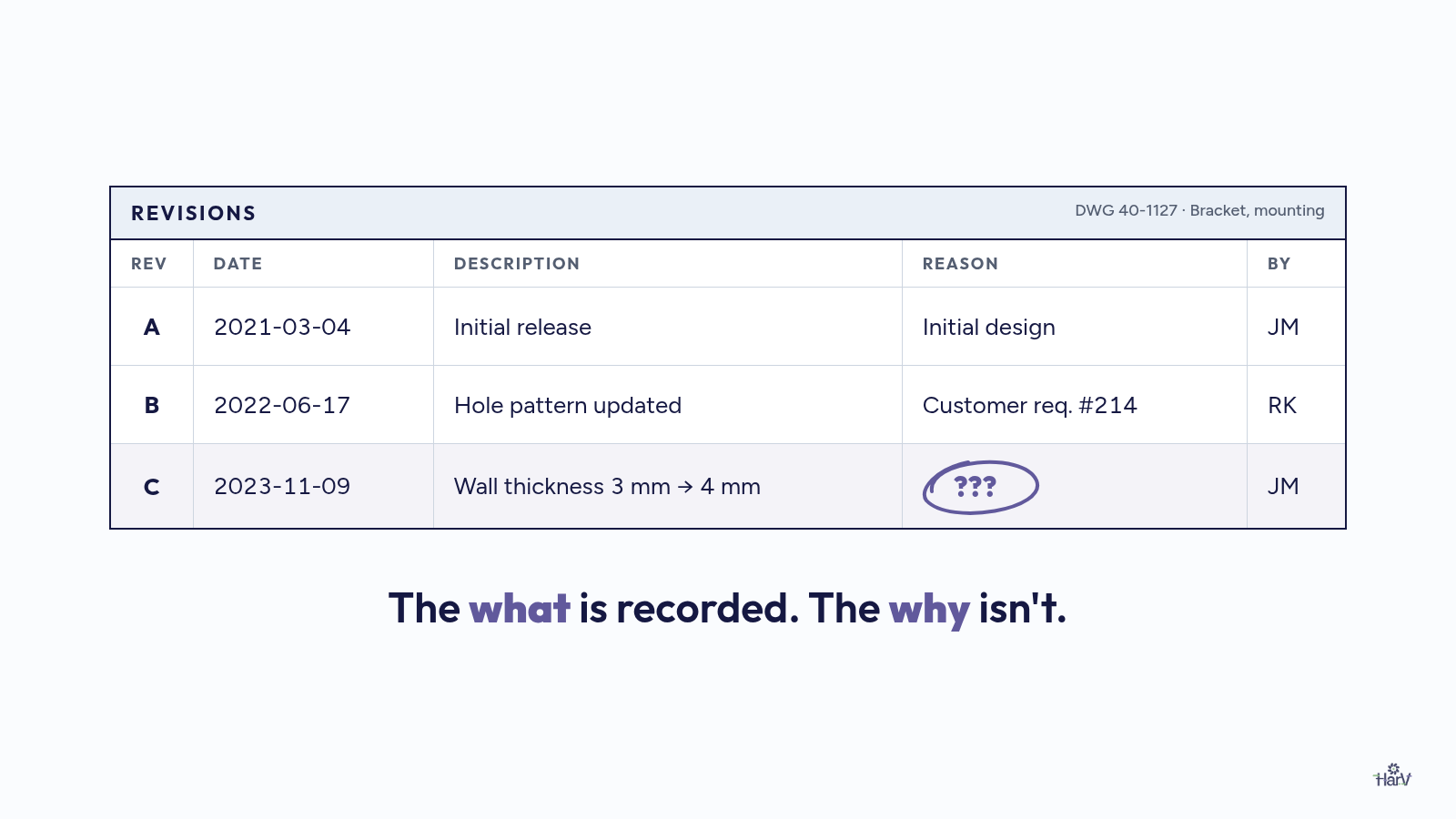
That reason lived in someone's head. Or in an email from 2022. Or in a meeting nobody wrote up. The drawing kept the what. The why walked out the door.
That's where the next post picks up.
Sources
Videos
- What are AI Agents?, IBM Technology (YouTube), 2024. https://www.youtube.com/watch?v=F8NKVhkZZWI
- AI Agents vs. LLMs: Choosing the Right Tool for AI Tasks, IBM Technology (YouTube). https://www.youtube.com/watch?v=I9z-nrk9cw0
- What's next for AI agentic workflows ft. Andrew Ng of AI Fund, Sequoia Capital (YouTube), 2024. https://www.youtube.com/watch?v=sal78ACtGTc
Papers
- ReAct: Synergizing Reasoning and Acting in Language Models, Yao et al. (Princeton, Google), 2022. https://arxiv.org/abs/2210.03629
- Toolformer: Language Models Can Teach Themselves to Use Tools, Schick et al. (Meta AI), 2023. https://arxiv.org/abs/2302.04761
- The Rise and Potential of Large Language Model Based Agents: A Survey, Xi et al. (Fudan University), 2023. https://arxiv.org/abs/2309.07864
Posts quoted
- Luigi Doria, SolidWorks AI agent demo, LinkedIn, 2026. https://www.linkedin.com/posts/luigidoria_solidworks-ai-engineering-activity-7509237391715598338-W-Tb
- Dirk Molitor, on Autodesk giving AI agents access to Fusion, LinkedIn, 2026. https://www.linkedin.com/posts/dirk-molitor_autodesk-just-gave-ai-agents-direct-access-activity-7507708188616458240-3rC6
Frequently asked questions
Is AI just a chatbot?
No. A chatbot is one way to use AI: you ask, it answers. AI can also read documents, compare them, use tools and flag problems as part of a task. That's usually called an agent.
What's the difference between automation and an AI agent?
Automation follows fixed rules you set up in advance: if X, do Y. An AI agent works toward a goal, reads what's in front of it, and decides the next step. It handles messier inputs, but you should still check its work.
Can AI replace engineering judgment?
No. AI can do the reading and cross-checking, but it doesn't know your customers, your machines or your history unless someone gives it that context. You decide. It assists.